I will also cover why phones switch off in hot weather, cold weather, and humid climates, because the fix is different depending on where you live.
Quick Answer — Why Does My Phone Switch Off by Itself?
- The battery is old or damaged and can no longer hold a stable charge
- The phone is overheating and shuts off as a safety measure
- A bad app is crashing the whole system
- A software bug or failed update is causing the shutdown
- A Scheduled Power Off setting is turned on without you knowing
- The internal storage is almost completely full
- Physical or water damage is causing random power loss
1. 10 Causes — Why Your Phone Switches Off Automatically?
Battery Problems
This is the number one cause. Phone batteries are made of lithium-ion cells.
Lithium-ion batteries slowly wear out over time. As the battery ages, it holds less charge and may become unstable under heavy use, which can cause unexpected shutdowns.
When the battery can no longer supply enough power during a demanding task, the phone shuts off suddenly to protect its internal parts.
A swollen battery is a clear sign of a serious problem.
If the back of your phone feels slightly raised or puffy, the battery has expanded with gas and needs to be replaced immediately.
Do not ignore a swollen battery.
Overheating
Every phone has a built-in temperature limit.
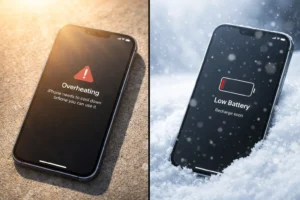
When the phone becomes too hot, it may shut down automatically to protect the battery and internal components.
This is not a fault. It is the phone protecting itself.
Common reasons for overheating: playing games for long periods, using the camera for extended video recording, charging while using heavy apps, direct sunlight, or a thick phone case that traps heat.
Software Bugs
A corrupted operating system file or an incomplete software update can cause the phone to crash and restart at random. This often happens right after an update was interrupted — for example, if the phone ran out of battery during the installation.
Faulty Apps
Some apps are poorly built or contain bugs that push the phone’s processor too hard.
When an app crashes badly enough, it can take the whole system down with it.
If your phone started switching off after you installed a new app, that app is the most likely cause.
System Update Needed
Manufacturers release software updates to fix known bugs, including ones that cause random shutdowns.
If your phone has not been updated in a while, a fix for your exact problem may already be waiting in an update.
Storage Problems
When storage becomes very low, the operating system may struggle to create temporary files, which can cause slowdowns, crashes, or instability.
Check your storage and delete what you no longer need.
Hardware Issues
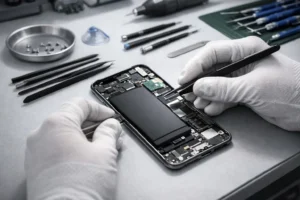
A loose battery connector, water damage, a cracked internal component, or a stuck power button can all cause random shutdowns.
A stuck or faulty power button is a common one — it sends a continuous “press” signal to the phone, which the system reads as a shutdown command.
Scheduled Power Off
Many Android phones include a feature called “Scheduled Power On/Off” that can turn the phone off automatically at a set time.
It lets you set a time for the phone to turn itself off automatically.
If this was turned on by accident — or by someone else — your phone will switch off at the same time every day.
Most people have no idea this setting exists.
iPhones do not have a built-in scheduled power-off feature.
RAM Overload
When too many apps run in the background at the same time, they fill up the phone’s RAM — the short-term memory it uses to run things.
When RAM is completely full, the system can become unstable and crash.
This is more common on phones with 2GB to 3GB of RAM, especially older models.
Malware or Rogue System App
A malicious app or a corrupted system app running in the background can force the phone to shut down.
This is less common than the other causes, but it does happen — especially on phones that have installed apps from outside the official app stores.
Safe Mode testing (covered in Fix 5) will reveal if this is your problem.
2. Quick Diagnosis Table — Find Your Cause Fast
Match your exact symptom below to the most likely cause and jump straight to the right fix.
| What Is Happening | Most Likely Cause | Go To |
|---|---|---|
| Shuts off only when hot | Overheating | Fix 2 |
| Shuts off with 20–40% battery remaining | Battery calibration error | Fix 7 |
| Shuts off at the same time every day | Scheduled Power Off setting | Fix 3 |
| Started after installing a new app | Faulty app | Fix 5 |
| Started right after a software update | Software bug | Fix 6 |
| Phone feels cold and shuts off outside | Cold weather battery drain | Climate section |
| Shuts off and also won’t charge properly | Battery or hardware damage | Fix 9 |
| Shuts off only when storage is nearly full | Storage problem | Fix 4 |
| Power button feels loose or sticky | Faulty power button | Fix 9 |
| Shuts off randomly with no pattern | RAM overload or software bug | Fix 8 |
3. How to Fix a Phone That Switches Off Automatically
Work through these in order.
Start with Fix 1 and stop when the problem is solved.
Check Battery Health and Charge Fully
Before anything else, check how healthy your battery actually is.
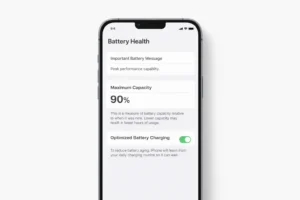
Anything below 80% usually means the battery is worn and may need replacement, especially if you are seeing poor battery life or unexpected shutdowns.
- Some Android phones show battery health in Settings → Battery or Battery Health, but the exact location varies by brand and model.
- Go to Settings
- Tap Battery
- Tap Battery Health & Charging
- Anything below 80% usually means the battery is worn and may need replacement.
Cool the Phone Down
If the phone feels warm before it shuts off, overheating is the cause. Here’s how to bring the temperature down:
- Remove the phone case — cases trap heat
- Move to a cool, shaded area away from direct sunlight
- Close all apps, especially games and video streaming
- Stop charging while using the phone — charging and heavy use together create the most heat
- Wait 10 minutes before turning the phone back on
The sudden temperature change creates condensation inside the phone.
This moisture can short-circuit components. Let it cool down naturally at room temperature.
Turn Off Scheduled Power Off
This hidden setting is the cause more often than most people realise.
Check it first if your phone switches off at the same time every day.
- Settings → Device Care or Utilities
- Find Scheduled Power On/Off
- Turn off both Power On and Power Off options
- Note: on Xiaomi/MIUI look under Settings → Additional Settings → Scheduled Power On/Off
iPhone
iPhone does not have a built-in scheduled power-off setting.
If you use the Shortcuts app, check whether you created a personal automation that may affect device behavior.
Free Up Storage Space
Your phone needs at least 1GB of free storage to run smoothly.
Check how much space you have and clear what you do not need.
- Settings → Storage
- Tap Clean Now or Free Up Space
- Delete unused apps, duplicate photos, old downloads
- Settings → General → iPhone Storage
- Tap Offload Unused Apps
- Review large files in each app category
Boot Into Safe Mode to Find Bad Apps
Safe Mode runs your phone with only the original built-in apps.
No third-party apps load. If your phone stops switching off in Safe Mode, a downloaded app is the cause.
- Hold the power button
- Long press Power Off on screen
- Tap OK when Safe Mode prompt appears
- Use the phone — if it doesn’t switch off, an app is guilty
- Restart to exit Safe Mode, then uninstall recent apps one by one
- iPhone does not have Safe Mode
- Instead, delete recently installed apps one at a time
- Restart after each deletion and test
Install the Latest Software Update
A known bug causing random shutdowns may already be fixed in a software update.
Check now.
- Settings → Software Update
- Tap Download and Install
- Restart after the update completes
- Settings → General
- Tap Software Update
- Install any available update
Make sure your phone is charged above 50% and connected to WiFi before starting an update.
An interrupted update can make the problem worse.
Recalibrate the Battery
If your phone shuts off while the battery still shows 20 to 40%, the battery meter is wrong.
The phone thinks it has run out when it hasn’t.
Recalibration resets the meter.
- Use the phone normally until the battery drains completely and it switches off
- Leave it off and plug it into charge
- Charge it all the way to 100% without using it or unplugging it
- Once at 100%, restart the phone
- Repeat this full drain-to-full cycle one more time
After two full cycles, the battery meter should be accurate again.
Clear RAM and Close Background Apps
Too many apps running in the background fill up your phone’s RAM and cause crashes. Clear them regularly.
- Settings → Device Care → Memory
- Tap Clean Now
- Or press the Recent Apps button and swipe all apps away
- Double-press the Home button (or swipe up and hold)
- Close only apps that are frozen or misbehaving
- Then restart the phone
Check for Physical or Water Damage
Look for these signs of physical damage:
- Foggy camera lens: moisture is inside the phone
- Swollen or raised back cover: the battery has expanded and must be replaced immediately
- Power button that sticks or clicks randomly: it is sending false shutdown signals
- Phone that only works when plugged in: the battery connector may be loose
Clean the power button gently with a dry cloth.
If it feels stuck or loose, take the phone to a repair shop.
Do not attempt to open the phone yourself unless it is out of warranty and you have experience.
A swollen battery is a safety hazard. Do not charge it or press on the back of the phone.
Take it to a repair shop or manufacturer service centre as soon as possible.
Factory Reset — Last Resort Only
If none of the fixes above have worked, a factory reset will wipe all software issues from the phone.
This erases everything — back up your data first.
- Settings → General Management
- Reset → Factory Data Reset
- Read the warning and confirm
- Settings → General
- Transfer or Reset iPhone
- Erase All Content and Settings
- Back up to Google Drive (Android) or iCloud (iPhone)
- Note down all WiFi passwords and app logins
- A factory reset cannot fix hardware damage — if the problem returns after a reset, the battery or another component needs to be replaced
4. Phone Switches Off With Battery Remaining — Deep Dive
This specific problem trips a lot of people up.
The phone shows 30% battery and then just dies.
No warning. It feels like a broken phone, but the fix is usually simple.
Why Does This Happen?
Your phone’s battery management system keeps track of how much charge is in the battery.
Over time, as the battery ages, this tracking becomes inaccurate.
The phone thinks it is at 30% when the battery can no longer actually deliver 30% worth of power.
So it shuts off.
Cold weather makes this worse. In temperatures below 0°C (32°F), the chemical reactions inside the battery slow down significantly.
Lithium-ion batteries can lose 20 to 50% of their effective capacity in freezing conditions — even if the battery is perfectly healthy.
This is why phones die at 40% or higher in winter.
Battery Health Thresholds
| Battery Health | What It Means | Action |
|---|---|---|
| 100% – 90% | Excellent — nearly new | No action needed |
| 89% – 80% | Good — normal wear | Monitor it |
| 79% – 70% | Degraded — noticeable drop in daily life | Consider replacing battery |
| Below 70% | Poor — random shutdowns likely | Replace battery soon |
Battery Replacement Cost by Brand (2026 Estimates)
Battery replacement prices vary by country, phone model, and repair provider.
Treat these as rough examples, not fixed prices.
| Brand | Official Service Centre | Third-Party Repair |
|---|---|---|
| Apple iPhone | $89 – $99 USD | $40 – $70 USD |
| Samsung Galaxy | $50 – $80 USD | $25 – $50 USD |
| Xiaomi / Redmi | $20 – $40 USD | $15 – $30 USD |
| OnePlus | $40 – $60 USD | $20 – $40 USD |
| Google Pixel | $70 – $90 USD | $35 – $55 USD |
If your phone is less than one year old, battery replacement is often covered for free by the manufacturer.
Check your warranty before paying for any repair.
5. Android vs iPhone Fix Comparison Table
| Fix | Android Path | iPhone Path | Difficulty |
|---|---|---|---|
| Check battery health | Settings → Battery or Battery Health (varies by brand) | Settings → Battery → Battery Health | Easy |
| Cool phone down | Remove case, close apps, shade | Same steps apply | Easy |
| Turn off Scheduled Power Off | Settings → Device Care → Scheduled On/Off | Not available as a built-in iPhone setting | Easy |
| Free up storage | Settings → Storage → Clean Now | Settings → General → iPhone Storage | Easy |
| Boot into Safe Mode | Hold Power → Long press Power Off → Safe Mode | Not available — delete apps manually | Medium |
| Software update | Settings → Software Update | Settings → General → Software Update | Easy |
| Recalibrate battery | Drain to 0%, charge to 100% twice | Same steps apply | Medium |
| Clear RAM | Settings → Device Care → Memory → Clean | Close only apps that are frozen or misbehaving, then restart the phone | Easy |
| Factory reset | Settings → General Mgmt → Factory Reset | Settings → General → Erase All Content | Hard |
6. Climate Tips — Hot, Cold, and Humid Regions
Where you live affects how your phone behaves.
The fixes above work everywhere, but these extra tips apply to specific climates.
Hot Climates — Middle East, South Asia, Sub-Saharan Africa, Southeast Asia
In regions where summer temperatures exceed 35°C (95°F), heat-related shutdowns are the most common complaint.
Phones left in cars are especially at risk — the inside of a parked car in direct sun can reach 70°C (158°F) or higher, well above any phone’s safe operating limit.
- Never leave your phone on a car dashboard or in a closed parked car
- Keep the phone out of direct sunlight when outdoors
- Remove the phone case during long charging sessions in warm rooms
- Only use chargers from the original manufacturer or a trusted brand — cheap chargers common in many markets generate excess heat and degrade the battery faster
Cold Climates — Northern Europe, Canada, Russia, High-Altitude Regions
Cold weather is one of the biggest hidden causes of unexpected phone shutdowns — and almost no troubleshooting guide mentions it.
Lithium-ion batteries can lose 20 to 50% of their usable capacity when temperatures drop below 0°C (32°F).
This is why a phone showing 40% battery can die completely when you step outside in winter.
- Keep your phone in an inner coat pocket close to your body — body heat keeps the battery warm
- Never charge your phone when it is very cold. Charging a frozen battery causes permanent internal damage called lithium plating
- If your phone shuts off in the cold, bring it inside and let it warm up to room temperature before turning it on again
- Turn on Battery Saver mode before going outside in freezing weather — it reduces power demands and helps the phone stay on longer
Humid Climates — Southeast Asia, Coastal Areas, Tropical Regions
High humidity means moisture in the air can slowly work its way into the phone — especially through the charging port, headphone jack, and gaps in the case.
Over time, this causes internal corrosion that leads to unstable power delivery and random shutdowns.
- Use a waterproof phone case if you live in a very humid area or work outdoors
- Do not charge your phone right after coming in from heavy rain or a very humid environment — let it dry first
- If you see fog behind the camera lens, moisture is already inside the phone — take it to a repair shop
7. Replace the Battery or Buy a New Phone?
This is the question everyone asks.
Here is a simple way to decide:
| Situation | Best Choice |
|---|---|
| Phone is under 1 year old, battery below 80% | Claim warranty — free replacement |
| Phone is 1 to 3 years old, battery below 80% | Replace the battery — cost-effective |
| Phone is 3 to 4 years old, battery below 70% | Replace battery if phone works well otherwise |
| Phone is over 4 years old, battery failing | Consider buying a new phone |
| Battery replacement costs more than 50% of phone value | Buy a new phone |
| Multiple hardware issues, not just battery | Buy a new phone |
A battery replacement from an official service centre is always safer than a third-party repair for iPhones specifically.
Apple says battery health information may be limited or inaccurate if the battery cannot be verified, which is one reason official or authorized battery replacement is often the safer option for iPhone users.
Frequently Asked Questions
The battery meter is inaccurate.
A degraded battery or cold weather causes the phone to lose power before the display reaches 0%. Recalibrate the battery by draining it to zero and charging it to 100% twice without interruption.
Check for a Scheduled Power Off setting first — it is the most overlooked cause. Then boot into Safe Mode to rule out bad apps. If neither fixes it, install any available software updates.
The update likely installed with an error. Go to Settings → Software Update and install any available patch. If restarts continue, a factory reset clears the corrupted files.
Yes. Repeated overheating can permanently reduce battery life. Avoid leaving the phone in a hot car or in direct sunlight for extended periods.
Replace the battery if the phone is under four years old and works well otherwise. Buy a new phone if the repair cost is more than 50% of the phone’s current value or if multiple things are failing at once.
✅ Final Verdict
Conclusion
A phone that keeps switching off is frustrating — but in most cases, it is not serious.
The problem almost always comes down to a tired battery, an overheating issue, a bad app, or a setting you never knew was there.
Start with the Quick Diagnosis Table to match your exact symptom to the right fix.
Work through the steps in order.
Most people solve the problem before they even reach Fix 5.
If this guide helped you fix the problem, share it with someone going through the same thing.
And if you’re still stuck after all 10 fixes, leave your phone model in the comments — I will point you in the right direction.



1 thought on “Why Does My Phone Switch Off Automatically? 10 Causes and Easy Fixes”
Pingback: Samsung Galaxy S25 Ultra vs iPhone 16 Pro Max Charging Speed Test - Real World Results 2026